Patient management
Patient profiles with allergies, conditions, visit history and consultation records, with likely duplicates flagged at registration.
Clinic management, simplified
Cliniqo brings patient records, appointments, prescriptions, follow-ups, doctors and clinic operations together in one secure platform.

Stop managing schedules across registers, calls and chat messages.
Keep patient information organised and available at the next visit.
Write structured prescriptions during the consultation, not afterwards.
Never lose track of when a patient should come back.
Product
Reception, doctors and administrators work in the same record, each with the access their role needs.

Features
Patient profiles with allergies, conditions, visit history and consultation records, with likely duplicates flagged at registration.
Book, reschedule and cancel from each doctor's real availability, across doctors and branches.
Every doctor signs in to their own view of today's appointments, their patients and recent prescriptions.
Dose, frequency and duration with meal timing (before meal, after meal) and slots for breakfast, lunch, dinner and bedtime. Download or print as PDF.
Record the plan, procedures, therapy and advice in each consultation, and follow a course of treatment session by session.
Upload photos during a consultation and compare before and after side by side, with a slider or as an overlay.
Set the follow-up date in the consultation and book the next appointment from the same screen.
Patients with an email address receive confirmation, reschedule and cancellation emails.
Add walk-ins with a token and see who is waiting, for how long, and who is with the doctor.

For doctors
Each doctor sees their own day, not the whole clinic's. Open the next patient, review their history and finish the visit without switching tools.
Consultation
Notes follow the order of the visit. The prescription is written alongside them and printed on the clinic's letterhead.


Clinical images
Take photos during the consultation, label them before, during, after or follow-up, and compare any two side by side. Photos stay private to the clinic.
Solutions
From a single consulting room to a clinic with several doctors and branches, everyone works from one patient record.

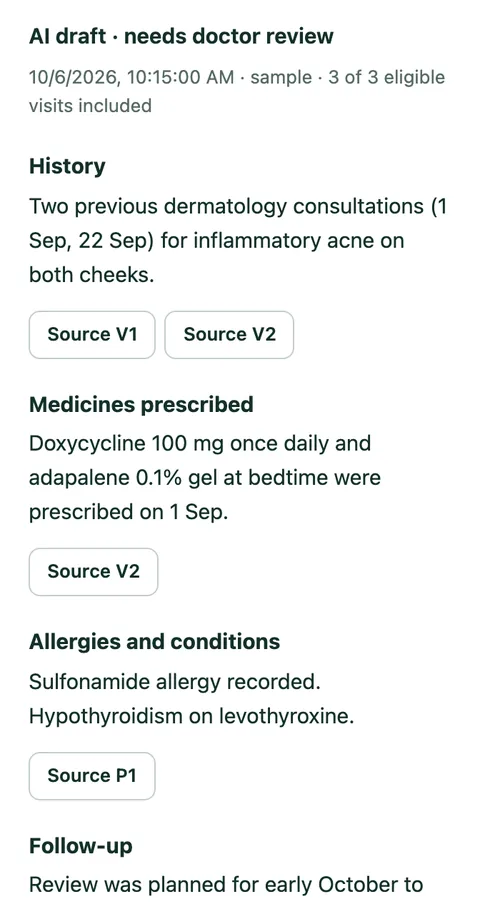
AI-assisted
AI can summarise relevant patient history to help doctors review previous consultations and records quickly. Each summary points to the visits it came from.
It is an assistant for reading records. It does not diagnose, recommend treatment or make clinical decisions, and the doctor reviews the records themselves. Clinics choose whether to turn it on.
Security & privacy
Hashed passwords, short-lived sessions and email-based password reset.
Doctors, reception, nurses and accounts each see only what their role allows.
Every record belongs to one clinic; no clinic can open another's data.
Clinical images are stored privately and opened through short-lived links.
Deactivated staff and suspended clinics are signed out immediately.
Sign-ins, account changes and access to clinical images are recorded.
How it works
Choose a plan, then add your branches, doctors and staff.
Register patients and keep their records in one profile.
Book appointments, write notes and create prescriptions.
Schedule the next visit and keep each patient's journey in order.
Pricing
Choose a plan when you create your clinic. Limits are shown exactly as configured for each plan.
Loading plans…
Several branches, many doctors or specific requirements? Talk to us about a plan that fits.
FAQ
Clinic management software. It keeps patient records, appointments, consultations, prescriptions, follow-ups, clinical images, doctors and staff together in one place.
Individual doctors, multi-doctor and multi-specialty clinics, and small hospitals or outpatient centres. Specialties are defined by each clinic.
Yes. Each doctor has their own sign-in, schedule and dashboard, and works from the clinic's shared patient records.
Yes. Each branch has its own address, timezone, working hours and holidays. Patient records are shared across branches.
Yes. Reception can book, reschedule and cancel appointments, add walk-ins and run the queue. What each person can do depends on their role.
Yes. Prescriptions are written during the consultation with dose, frequency, meal timing and duration, and can be downloaded or printed as a PDF.
Treatment plans, procedures and therapy are recorded in each consultation, and clinical photos can be grouped by treatment and session. Cliniqo does not sell or bill treatment packages.
Patients with an email address receive an email when an appointment is booked, rescheduled or cancelled. Cliniqo does not send scheduled reminder messages before the visit.
Yes. Photos can be uploaded during a consultation, labelled before, during, after or follow-up, and compared side by side. They are stored privately.
Yes, if the clinic enables it. Doctors can generate a short summary of previous visits that links back to its sources. It is a reading aid, not a diagnosis.
Choose a plan, monthly or annual, when you create your clinic and pay online. Your clinic is ready as soon as the payment is confirmed, and you can cancel from Settings → Subscription.
Use the contact address shown on this page when one is published, or ask your clinic administrator.
Set up your clinic, bring your team together and manage your daily workflow from one place.